


There are two ways to speed up trade execution on the VT Markets App: disabling trade confirmations and using One-Tap Trading.
Disable Trade Confirmations
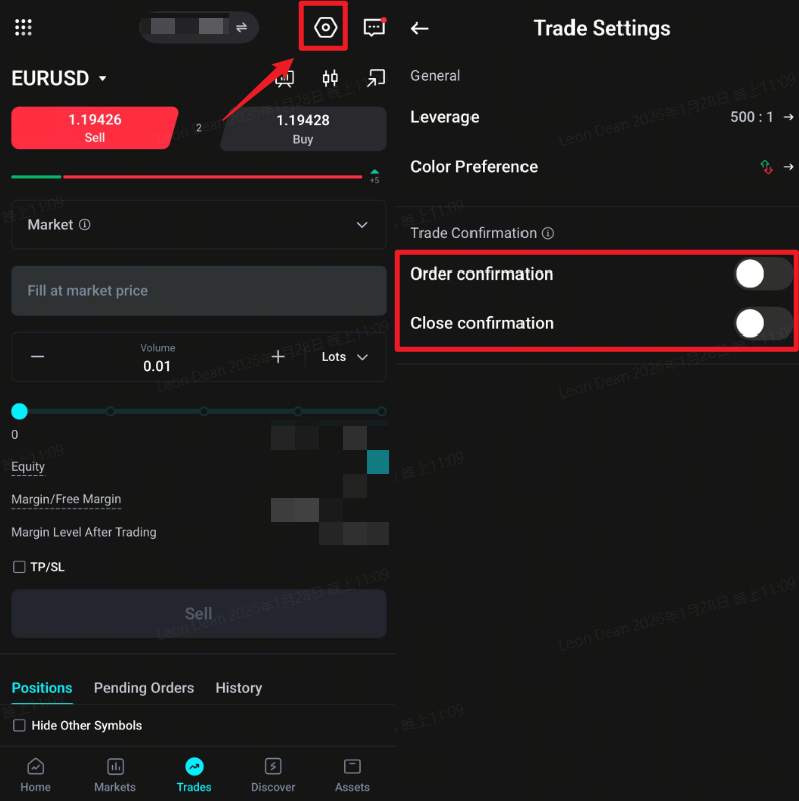
This removes the confirmation pop-up before each trade, so orders execute immediately when you tap Buy or Sell.
- 1. Open the VT Markets App.
- 2. Tap Trade on the bottom menu.
- 3. Tap the Settings icon (gear icon) in the top-right corner.
- 4. Go to Trade Settings.
- 5. Turn off all Trade Confirmation options.
One-Tap Trading
This lets you place trades directly from the chart view with a single tap.
- 1. Open the VT Markets App.
- 2. Tap Trade on the bottom menu.
- 3. Tap the candlestick icon to open the chart view.
- 4. Select One-Tap mode.